TABLE OF CONTENTS
- eBooks: Force Reauthorization in Adobe Digital Editions
- Migration error: Adobe ID is not recognized by ByteBooks
- Migration error: The email address associated with the Adobe ID can no longer be accessed
eBooks: Force Reauthorization in Adobe Digital Editions
If you are unable to revoke authorization in Adobe Digital Editions because the password is not recognized, you can force the program to deauthorize using the following method:
On Windows 10 and 11: Delete the Adobe Adept folder
- Completely close Adobe Digital Editions.
- Open the “Registry Editor” using Windows Search.
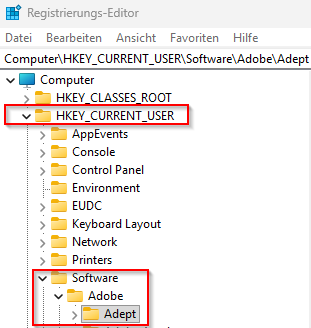
- Under the HKEY_CURRENT_USER key, locate the “Software” folder and the “Adobe” subfolder. In the “Adobe” folder, right-click the entire “Adept” subfolder and select “Delete” – confirm the prompt by clicking “Yes”.
- Then restart Adobe Digital Editions and log in again.
macOS 15 and macOS 26: Delete activation.dat
- Completely close Adobe Digital Editions.
- Open Finder.
- In the menu bar, click “Go” → “Go to Folder…” (or alternatively, press Shift + Cmd + G).
- Enter the following path and press Enter: ~/Library/Application Support/Adobe/Digital Editions.
- Right-click the activation.dat file and delete it.
- Restart Adobe Digital Editions and reauthorize the device.
- IF the problem persists: Delete the entire Adobe Digital Editions folder, then restart Adobe Digital Editions.
Migration error: Adobe ID is not recognized by ByteBooks
Error message: USER_DOES_NOT_EXIST: User does not exist. Please sign up as a new user.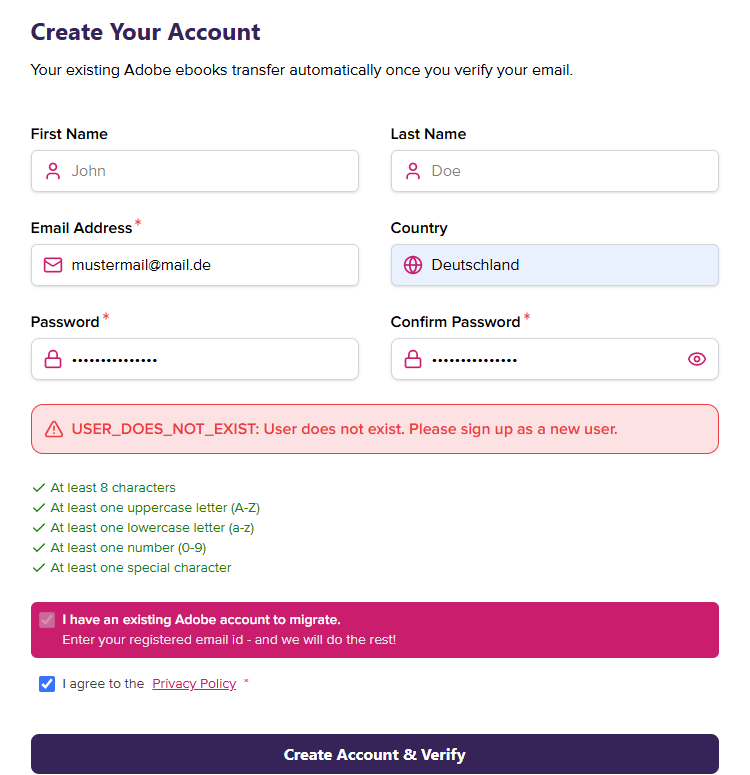
- Open an authorized version of Adobe Digital Editions. Press Ctrl+Shift+I to open the authorization information.
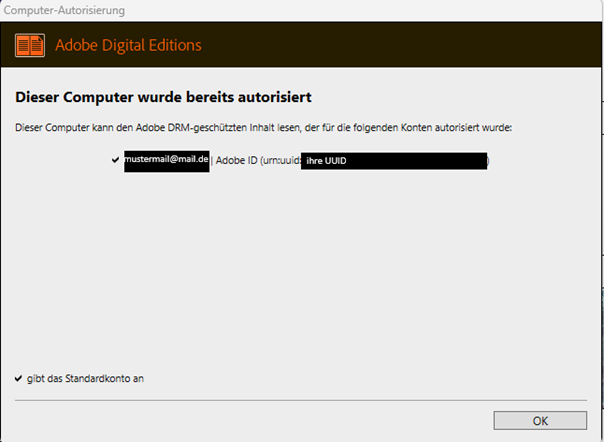
- Check: Does the email address on file match the address being used to attempt the migration? Pay attention to spelling and special characters.
- If the email address being used is correct and the error still occurs, contact ByteBooks Support.
- Send a request to ebooks-support@wipro.com, including the error message, the email address to be used for the migration, and the UUID from the authorization information.
- IMPORTANT: In this case, Wipro Customer Service will typically need to perform a manual account recovery. Wipro is expected to offer this service only until November 30, 2026. Therefore, it is best to complete the account linking as soon as possible so that you can receive assistance from Wipro if needed.
Migration error: The email address associated with the Adobe ID can no longer be accessed
To successfully complete the registration, you will receive an email from ByteBooks in the final step containing a code that you must enter on the ByteBooks website. If you no longer have access to the email address associated with your Adobe ID (because it is no longer active or you no longer have the login credentials), you can take the following steps:
- Open an authorized version of Adobe Digital Editions. Press Ctrl+Shift+I to open the authorization information.
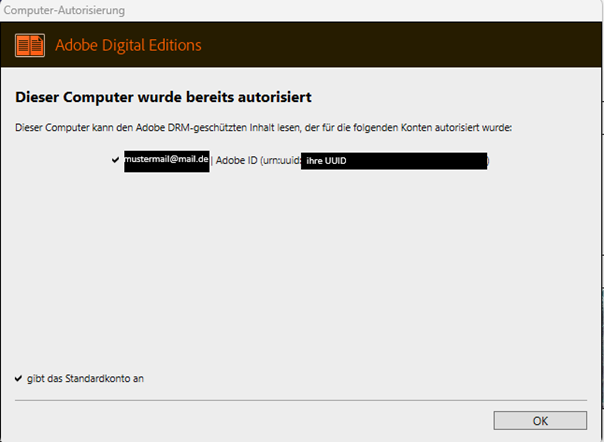
- Check: Does the email address on file match the address to be used for the migration? Also make a note of the UUID. This will be needed to resolve the issue with Wipro Customer Service.
- Send a request to ebooks-support@wipro.com, including a problem description, the email address to be used for the migration, and the UUID from the authorization information.
- IMPORTANT: In this case, Wipro Customer Service will typically need to perform a manual account recovery. Wipro is expected to offer this service only until November 30, 2026. Therefore, it is best to complete the account linking as soon as possible so that you can receive assistance from Wipro if needed.
Was this article helpful?
That’s Great!
Thank you for your feedback
Sorry! We couldn't be helpful
Thank you for your feedback
Feedback sent
We appreciate your effort and will try to fix the article